
Landing your first job in Information Technology is exciting. But the competition is fierce. Your resume isn’t just a document; it’s your first interview. It’s the key that opens the door to your dream career in software development, testing, or support.
For a new graduate with no corporate experience, writing a resume can feel overwhelming. What do you include? How do you stand out? This guide is crafted specifically for you. We’ll walk through the exact process of building a fresher resume for IT jobs that gets noticed by recruiters and Applicant Tracking Systems (ATS). You’ll learn the structure, essential sections, and the subtle tricks that make a resume look professional and promising.
By the end, you’ll know how to write a fresher resume for IT jobs that effectively showcases your potential, projects, and readiness to contribute from day one.
What Is a Fresher IT Resume?

A fresher resume for an IT job is a targeted document designed for recent graduates or career starters with minimal formal work experience in the industry. Its core purpose is different from an experienced professional’s CV.
Instead of listing a decade of job history, a fresher resume focuses on potential. It highlights academic foundation, relevant technical skills, practical projects, and a demonstrated ability to learn and apply new technologies. It answers the recruiter’s primary question: “Does this candidate have the foundational knowledge and problem-solving mindset we can train?”
Think of it as your professional story’s first chapter. It connects your academic learning to real-world application, proving you’re not just theoretically sound but also practically inclined.
Why a Strong Fresher Resume Matters in IT

The IT hiring process for entry-level roles is a numbers game. A single job posting can attract hundreds of applications. Recruiters often spend mere seconds on an initial scan. Your resume must make an immediate, positive impact.
A well-structured resume does more than list your details. It passes through automated ATS filters that screen for specific keywords like “Java,” “Python,” or “SQL.” It then quickly communicates your suitability to a human reviewer. A weak resume, no matter how skilled you are, might never be seen.
Furthermore, a polished resume builds confidence. Walking into an interview knowing you’ve presented your best self on paper sets a positive tone. It shows professionalism and attention to detail—highly valued traits in the IT world.
The Non-Negotiable Basics of Your First IT Resume
Before we dive into formatting, let’s cover the universal rules. Ignoring these can get your resume rejected instantly.
- One Page Only: As a fresher, you do not need more than a single, well-organized page.
- Clean, Professional Formatting: Use a simple, modern font (Calibri, Arial, Segoe UI). Maintain consistent spacing and margins. Avoid colors, graphics, or fancy templates unless you’re applying for a design role.
- ATS-Friendly File Type: Save and send your resume as a PDF unless the job description explicitly asks for a .docx file. A PDF preserves formatting.
- Zero Typos: Grammar and spelling errors scream carelessness. Use tools like Grammarly, but also read it aloud and have a friend review it.
- Quantify When Possible: Even in projects or academics, use numbers. “Improved application performance by 15%” is stronger than “worked on performance improvement.”
The Core Structure: Building Your Resume Step-by-Step
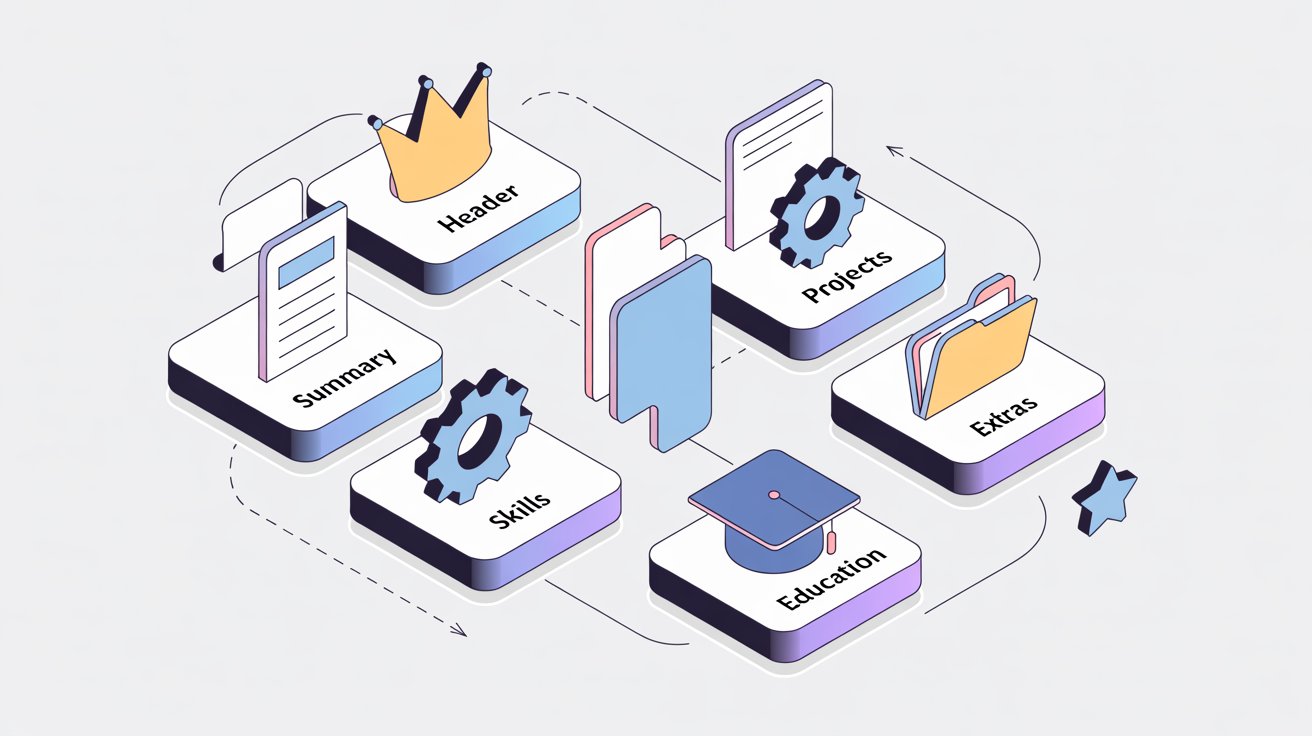
This is your blueprint. Follow this order for a logical, compelling flow.
1. Header and Contact Information
Keep this simple and clear. Include your full name (slightly larger font), phone number, professional email address (e.g., firstname.lastname@gmail.com), your LinkedIn profile URL (ensure it’s updated!), and your city/state. No need for “Resume of” or a photograph.
2. Professional Summary / Objective
This is a 2-3 line pitch at the top. For a fresher, an Objective Statement is often effective. Tailor it for the specific job.
- Weak: “Seeking a challenging role in a growth-oriented company.”
- Strong: “Recent Computer Science graduate with a strong foundation in Java and Python, seeking a Software Developer role. Aiming to apply my knowledge of data structures and problem-solving skills developed through academic projects to contribute to XYZ Tech’s development team.”
3. Technical Skills Section
This is the heart of your IT resume. List your skills in a clean, scannable format. Categorize them for clarity.
- Programming Languages: Java, Python, C++, JavaScript
- Web Technologies: HTML5, CSS3, React, Node.js
- Databases: MySQL, MongoDB
- Tools & Platforms: Git, GitHub, VS Code, Eclipse, Docker (if familiar)
- Concepts: Data Structures, OOPs, SDLC, Agile Methodologies
Be honest. Use terms like “Proficient in,” “Familiar with,” or “Beginner level” if needed.
4. Projects Section (Your Experience Replacement)
This is where you prove your skills. List 2-3 significant academic or personal projects.
For each project, use the PAR (Problem-Action-Result) framework:
- Project Title: Inventory Management System
- Tech Stack: Java, MySQL, JDBC
- Description: “Developed a console-based application to solve the problem of manual inventory tracking for small businesses. Actions taken: Designed a normalized database, implemented CRUD operations, and added a user authentication module. The result: The system automated stock level updates, reducing hypothetical tracking errors by ~30%.”
5. Education
List your degree(s) in reverse chronological order. Include: University/College name, degree (e.g., B.Tech in Computer Science), graduation year (or expected year), and CGPA/Percentage (if it’s strong, typically >7.5/10 or >75%). You can include relevant coursework like “Advanced Algorithms” or “Database Management Systems.”
6. Additional Sections (If You Have Space)
- Certifications: Coursera, Udemy, or official certifications (e.g., AWS Cloud Practitioner, Microsoft Azure Fundamentals).
- Achievements: Hackathon rankings, coding competition wins, university scholarships.
- Extracurriculars: Relevant roles like coding club president, volunteer tech teaching.
Common Mistakes Every Fresher Should Avoid
- Writing a Responsibilities List, Not an Achievement List: For projects, focus on what you did and what the outcome was, not just the features of the project.
- Being Too Vague: “Good communication skills” is meaningless. Show it through a well-written cover letter and a clear resume.
- Including Irrelevant Information: Your high school marks or hobbies like “reading books” rarely add value. Only include hobbies if they demonstrate a relevant skill (e.g., “Contributing to open-source projects on GitHub”).
- Using a Generic Resume for Every Job: Take 10 minutes to tailor your Objective and Skills section to match the keywords in each job description.
- Neglecting the LinkedIn Profile: Recruiters will check it. Ensure your LinkedIn details match your resume and provide more depth.
Frequently Asked Questions About Fresher IT Resumes
How to prepare resume for freshers in IT company?
Focus on projects and skills. Create a clean, one-page document where your academic projects demonstrate applied technical knowledge, and a well-organized skills section matches the keywords from the job description you are targeting.
What are the IT skills for resume?
List specific, categorized technologies. Include programming languages (Java, Python), web technologies (HTML, React), databases (MySQL), tools (Git, Docker), and core concepts (Data Structures, OOP). Always tailor this list to the specific job ad.
What is the 7 second rule in resume?
It’s the average initial scan time by a recruiter. Your resume must pass this test with a clean layout, clear headings, and prominent keywords that immediately signal you are a relevant candidate for the role.
How to write “I am fresher” in a resume?
Frame it positively in your summary statement. Write: “Recent [Your Degree] graduate with a strong foundation in [Key Skills] and hands-on project experience, seeking to contribute to a [Job Title] role.” This presents your status as readiness to apply knowledge.
What are the 7 steps of a resume?
The core structure is: 1. Contact Header, 2. Professional Summary, 3. Technical Skills, 4. Projects, 5. Education, 6. Certifications, 7. Achievements/Extracurriculars. This order highlights a fresher’s strongest assets first.
How do I say I’m fresher?
State it as a positive attribute of potential. Say: “As a recent graduate, I bring updated academic knowledge, a strong grasp of [mention a key concept like DSA], and a dedicated approach to applying my skills through project work.” This shifts focus from lack of experience to current capability and learnability.
Conclusion
Writing your first resume for IT jobs is a foundational career skill. It requires you to reflect on your learnings, package your potential, and present it with clarity and confidence. Remember, the goal isn’t to fabricate experience but to strategically present the experience you do have—your projects, your skills, your academic work—as evidence of your readiness to work.
Start by gathering all your information: degree details, project reports, certificates. Then, follow the step-by-step structure outlined here. Build your first draft, then refine it. Tailor it for each application, focusing on the keywords in the job description.
Your journey starts with this document. Make it count. For more guidance on your job search, explore our guide on [Internal Link: Common Interview Questions for Freshers] and how to prepare for your first [Internal Link: IT Technical Interview].
Disclaimer: This article is for informational purposes only. Resume standards and expectations can vary by company and region. Please verify specific requirements from official company career portals or seek advice from your university’s placement cell.